We all like drawing cool characters but getting the angles and proportions right can be a bit too time consuming if you plan to create dozens of unique characters.
To speed up my creation process of character designs I’ve created a Blender setup that lets me render different camera angles of a 3D mannequin. This way I’m able to put together a solid character sheet in minutes.
In addition to that, I added a colorized grid that lets me understand the perspective within milliseconds. BOOM!

How it’s done?
!! If you are new to Blender or want to save some time you can simply download my camera setup + a simple drawing-figure on gumroad for only 2$. Just head over to my Store. !!
So the basic concept here is that we have one camera the consists of multiple other cameras. We can enable this by checking “Stereoscopy” in the “Output Properties” panel. Funny thing is that we can create more than two cameras (stereo… lol). Now select “Multi-View”.
So if you have created multiple cameras already in your scene, you can add them to the multi-view list now. Or you create the camera list first and add the camera objects to your scene afterwards.
Notice that the cameras have to be named Camera+Suffix.


For the Output options under “Views” you should select Individual. That lets you render the cameras to separate files.

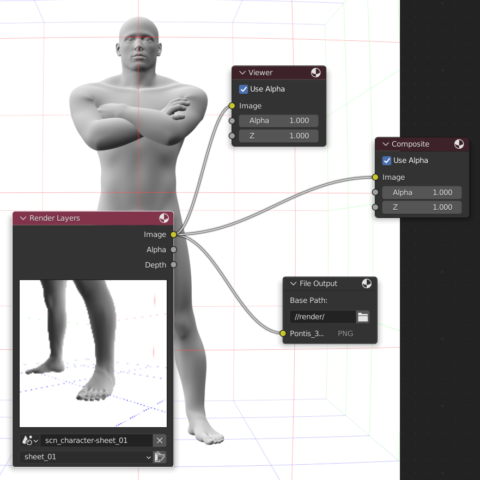
Compositor Setup
Quite handy comes in the compositor that let’s you choose the output file name and much more 🙂
For example, I could create different poses for every frame. That would allow me to render a whole bunch of different angles and poses which are all sorted by number(=frame).


If you want to save you the hassle, you could just download the blendfile on gumroad for only 2$.
You can put this up all by yourself but I put some serious thought into this and I think this will make your life easier.
About the model
I’ve been using the the Universal Human Rig by Chris Jones here, which is really nice but a bit pricey.

If you want to have a simple yet flexible drawing mannequin, check out Body Chan or Body Mechanics Rig by vinchau on Blendswap! They are amazing. One Rig is included in the Gumroad pack, so be sure to check it out!
Leave a Reply